
Password Strength Checker
Type a password to see how strong it is. The checker runs entirely in your browser — nothing is sent anywhere — and looks at length, character variety, common and leaked-style passwords, keyboard patterns, repeated characters, sequences and dates. It gives a rough estimate of how long guessing would take and explains exactly what would make it stronger. A generator creates strong random passwords and passphrases.
- Free to use
- No sign-up
- Runs in your browser

Password strength checker
Generate a strong password
Tip: rather than typing a password you actually use, test one with the same structure.
Password Security Kit
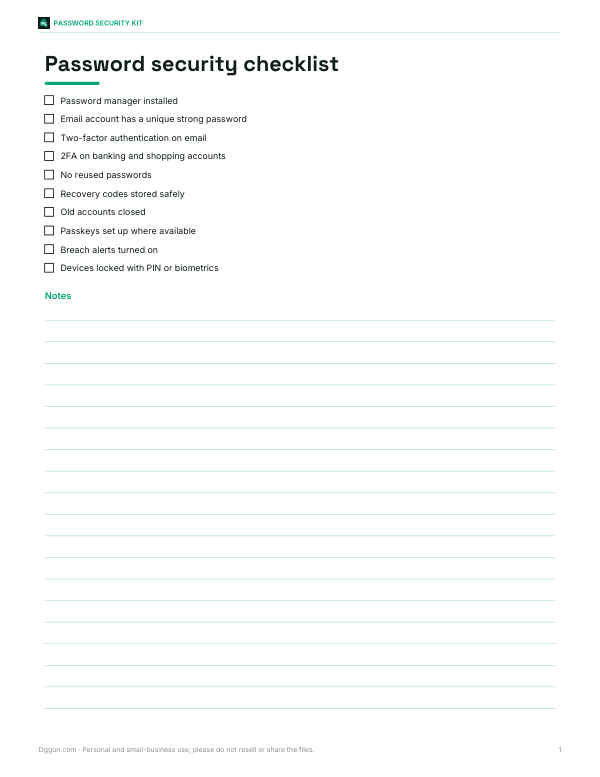
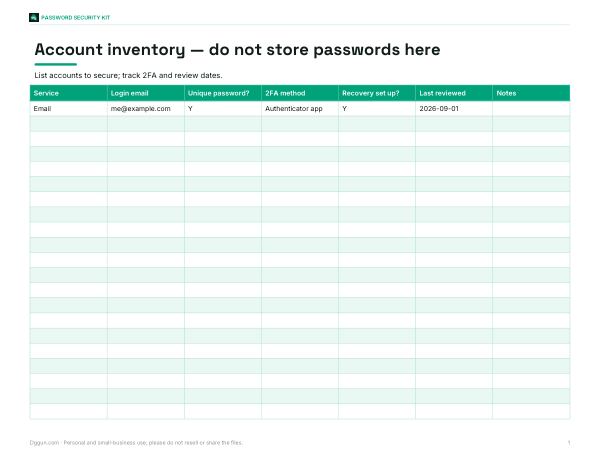
Printable password security checklist, a household account inventory workbook (no passwords stored), a 2FA setup tracker and a family online safety guide.
- Security checklist (PDF, DOCX)
- Account inventory (XLSX)
- 2FA tracker (PDF, DOCX, XLSX)
- Family guide (DOCX/PDF)
Formats: PDF, DOCX, XLSX. Instant download after payment (link valid 72 hours, up to 5 downloads). AI-assisted: the templates were drafted with AI help and reviewed and laid out before publishing.
$5.00 USD, one-time 4 files · about $1.25 each
- Instant download
- 7-day refund
- Secure checkout by Stripe
7-day money-back guarantee. Full refund within 7 days of purchase, even after you download.
Free sample: 2FA Setup Tracker (PDF, 57 KB)
Full refund within 7 days — see the refund policy and license.
Free printables
Single sheets you can print right now, no sign-up. The full pack adds every sheet in one download plus the editable files.
 Printable Family Password Safety Guide
What makes a password strong
A strong password is one an attacker cannot guess in any reasonable time. Two things matter most: length and unpredictability. Each extra character multiplies the number of possible passwords, so a long password is far harder to crack than a short complex one. But length only helps if the password is not predictable — “Password12345678” is long and still weak because it follows patterns attackers try first. The strongest passwords are long and random, or long passphrases made of several random words.
How the checker works
The checker first estimates entropy — the number of bits of randomness — from the length and the types of characters used: lowercase letters (26 options per character), uppercase (26), digits (10) and symbols (about 33). It then subtracts for patterns that make guessing easier: common passwords, dictionary words, keyboard walks such as “qwerty”, sequences like “abc” and “123”, repeated characters, years, and the very common “Capital-word-numbers-symbol” structure. The result is a rough strength rating and crack-time estimates for three attack scenarios.
Understanding crack-time estimates
| Scenario | Guesses per second (illustrative) | When it applies |
|---|---|---|
| Online, throttled | About 100 | An attacker trying logins on a website that limits attempts |
| Offline, slow hash | About 10,000 | Stolen password database protected with bcrypt, scrypt or Argon2 |
| Offline, fast hash | About 10 billion | Stolen database with unsalted fast hashes, cracked on GPUs |
These are illustrative rates, not measurements of any particular system. Real attackers use huge lists of leaked passwords and rules that transform them, so predictable passwords fall much faster than the raw entropy suggests. That is why the checker penalises patterns heavily.
Examples
| Password | Assessment |
|---|---|
| 123456 | Very weak — among the most common passwords in leaked lists |
| Summer2024! | Weak — common word, a year and a trailing symbol |
| P@ssw0rd | Very weak — substitutions like @ for a and 0 for o are well known |
| correct-horse-battery-staple | Strong length, but famous — never use published examples |
| tulip-orbit-kettle-walrus-quartz-58 | Very strong — random words from the generator |
| k7#Qm2!vR9xL@4pW | Very strong — 16 random characters |
Passphrases vs random passwords
Random character passwords pack the most strength into the fewest characters but are hard to remember and type. Passphrases — several randomly chosen words — are easier to remember and type on phones, and five or six random words give strong protection. The key word is random: words chosen by a person (a favourite song lyric or quote) are far more predictable than words picked by a computer. The generator uses your browser’s cryptographically secure random number generator for both types.
Best practices
- Use a password manager to create and remember a unique random password for every account.
- Never reuse passwords — when one site is breached, attackers try the same email and password everywhere (credential stuffing).
- Turn on two-factor authentication (2FA) wherever possible, preferably with an authenticator app or security key rather than SMS.
- Use passkeys where offered; they replace passwords with cryptographic keys that cannot be phished.
- Change a password when a service reports a breach or you suspect it was exposed — forced regular changes are no longer recommended by many security guidelines when there is no sign of compromise.
- Protect your email account most of all, since it can reset every other password.
What current guidance says
Modern guidance such as the US NIST digital identity guidelines favours longer passwords and passphrases, checking new passwords against lists of known compromised passwords, allowing all characters including spaces, and not forcing arbitrary composition rules or regular expiry. Many organisations now require a minimum of 12–15 characters for staff accounts and encourage password managers and multi-factor authentication.
Worked example
The default password “Summer2024!” is 11 characters with all four character types, which sounds good — about 72 bits by raw calculation. But it follows the most common structure (capitalised word, digits, symbol), contains a year and a season word that appears in many leaked lists. After those penalties the checker rates it weak, and a fast offline attack could guess it in seconds. A generated five-word passphrase such as “maple-radar-velvet-otter-cabin-41” rates very strong while still being easy to type.
Is it safe to test a password here?
The checker runs entirely in your browser with no network requests — you can disconnect from the internet and it still works. Nothing is logged, stored or sent. Even so, good practice is not to type real passwords into any website you do not need to; test a password with the same structure instead, then create your real one in a password manager.
Privacy
No data leaves your device. The page does not store what you type, and the generator uses the browser’s built-in secure random numbers.
Frequently asked questions
How long should a password be?
At least 12 characters, and 16 or more for important accounts; passphrases of 5–6 random words are also strong.
Are symbols required for a strong password?
They help a little, but length and randomness matter more.
Is it safe to type my password here?
The checker runs locally and sends nothing, but testing a similar password is best practice.
Why is P@ssw0rd weak?
Common letter-to-symbol substitutions are the first variations attackers try.
What is password entropy?
A measure in bits of how unpredictable a password is; each extra bit doubles the guesses needed.
Should I use a password manager?
Yes, it lets you use a unique random password for every account.